When designing scenarios, it's important to understand how customer flow behaves when multiple branches reconnect to the same node. It can lead to duplicate email sends, which is a known and expected behavior of the platform. This article explains why it happens and how you can prevent it.
Why can duplicate emails occur?
In scenarios, nodes can have multiple outputs. Each output represents a different branch a customer profile may follow based on the defined conditions.
Because of this:
A single customer profile can be assigned to more than one branch.
If those branches merge back into the same node later in the scenario, the customer profile will enter that node multiple times.
If that node acts (for example, by sending an email), the action will execute each time the customer profile reaches it.
As a result, the same email may be sent to the same customer more than once.
This behavior is expected because the scenario processes each path independently, rather than merging the customer journey into a single execution.
Example scenario
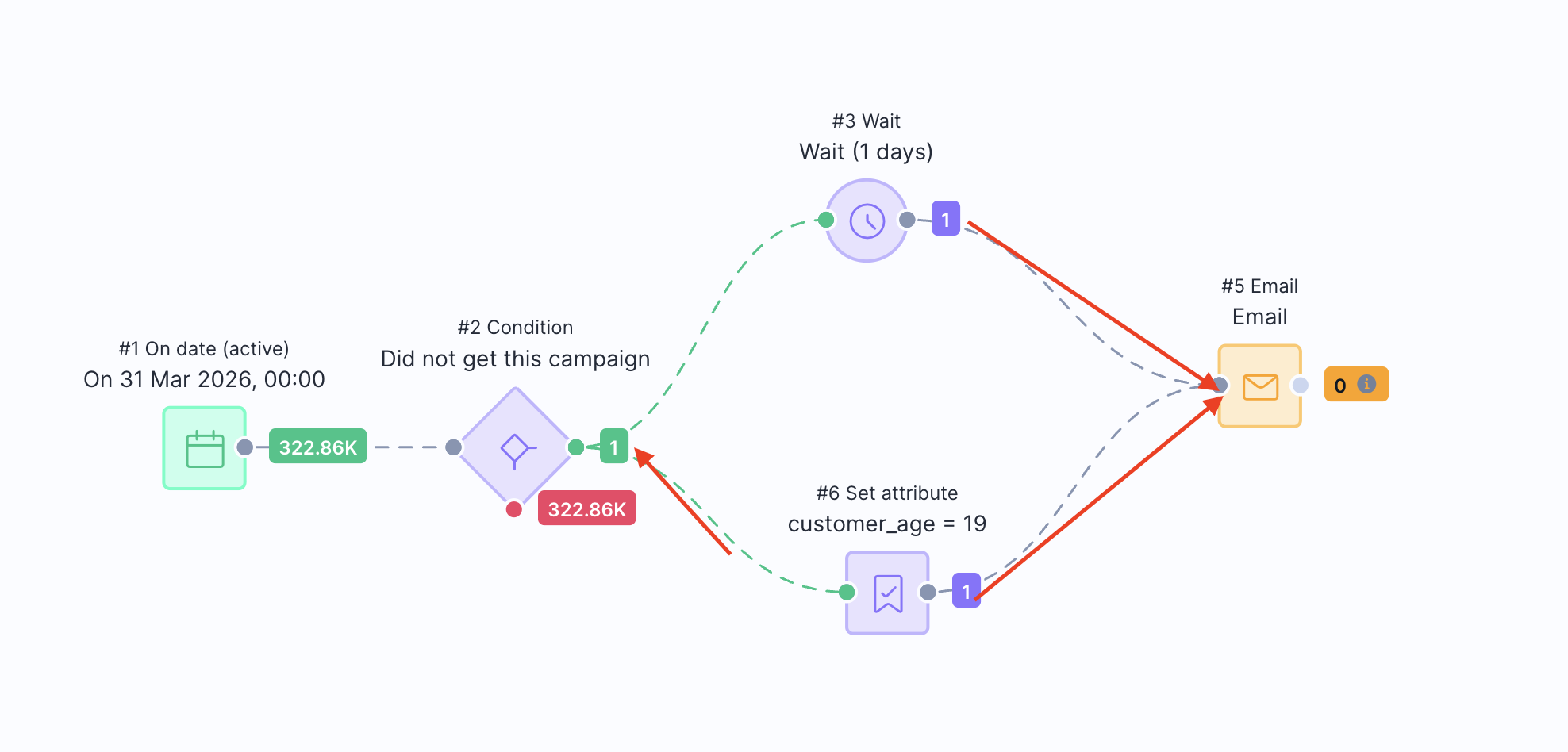
Consider a scenario that checks whether a customer profile has previously received a specific campaign.
A Condition node (Node 2) evaluates whether the customer profile has already received the campaign.
Based on this evaluation, the scenario splits into two branches:
Branch A: The customer profile waits for 1 day, then proceeds to the Email node (Node 5).
Branch B: The scenario sets certain customer attributes, and then also proceeds to the Email node (Node 5).
As the customer profile qualifies for both branches, the following occurs:
The customer profile reaches the Email node through Branch A, triggering the email send.
The same customer profile later reaches the Email node again through Branch B, triggering the email a second time.
Because the email node processes each entry independently, the system treats these as separate executions. As a result, the customer receives two identical emails.
How to prevent duplicate sends
To avoid duplicate emails in your scenarios, consider the following best practices:
- Avoid merging branches before actions
If multiple branches connect to the same email node, customer profiles can enter that node multiple times. Instead, ensure that each branch leads to a dedicated action, or that only one path leads to the email.
- Ensure a customer profile can reach an action node only once
Design your logic so that only one path in the scenario can lead a customer profile to a specific email node.
- Simplify scenario logic
Complex branching structures increase the likelihood of duplicate entries into nodes. Where possible:
Reduce unnecessary branching
Combine conditions earlier in the scenario
Keep customer flows straightforward
Summary
Each scenario branch is processed independently. If multiple branches reconnect to the same node, a customer profile may enter that node multiple times - triggering the same action repeatedly. This behavior applies to all node types in the scenario.
By carefully structuring your scenario logic and avoiding branch merging before action nodes, you can ensure that customers receive each email only once.