Depending on the Bloomreach SDK version your mobile app uses, mobile push notification tokens can be retrieved from a customer property, or from an event 'notification_state'. However, there are cases when a newer version of Bloomreach SDK, which uses the notification_state event, may retrieve the push token from the customer property.
In this article, we will explain where the platform takes the push token from for different SDK versions and how token selection works with the legacy/default application.
When is the token only taken from a customer's property?
Pure legacy
For older SDK versions released prior to September 26, 2025, when multi‑app support was introduced, tokens are only stored and resolved from customer properties. When you send a mobile push, the system reads those properties and uses them as the token source. This includes:
Android SDK < 4.6.0
Tokens are written to google_push_notification_id/huawei_push_notification_id on the profile.
iOS SDK < 3.8.0
Tokens are written to apple_push_notification_id on the profile.
React Native SDK < 2.5.0, Flutter SDK < 2.3.0
Wrapper behavior mirrors the underlying Android/iOS versions: tokens are taken only from customer properties.
Note that in these pure legacy versions:
There is no Application ID awareness in token storage.
Each customer can have at most one active token per platform.
If the property is empty or stale, the system has no other token to fall back to.
How to find the token value on the profile for "pure legacy" versions?
Go to the selected customer profile.
In the Properties section, look up apple_push_notification_id, google_push_notification_id, or huawei_push_notification_id, depending on the platform.
When is the token taken from a notification_state event?
Newer versions
Once you move to newer SDK versions from September 26, 2025, onward, the primary token source becomes notification_state events. This includes:
Android SDK 4.6.0 and higher
iOS SDK 3.8.0 and higher
React Native SDK 2.5.0 and higher
Flutter SDK 2.3.0 and higher
Note that in these newer versions:
Multiple tokens per customer are possible.
Multiple mobile apps per project are supported.
For default-application application_id, legacy customer properties remain a fallback (see later in this article).
How to find the token value on the profile for newer versions?
Go to the selected customer profile.
Find the latest valid notification_state event for the target application_id and platform.
Use the event's push_notification_token attribute as the token source.
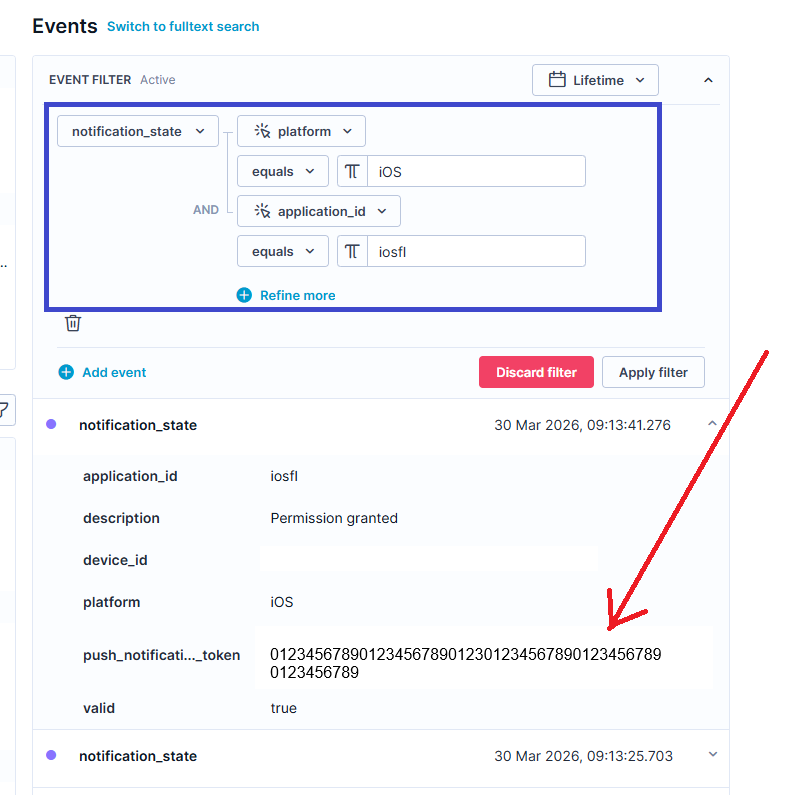
What is the legacy fallback, and how is the token selected in the default application?
The default-application (also referred to as the legacy app) is a system Application ID introduced to keep old setups working while you migrate to the event‑based model. This ID is automatically used when you don’t specify any application_id in the SDK config.
This section applies to all newer SDK versions introduced from September 26, 2025, onward, where the application ID is set to 'default-application' (How to configure and check application ID for iOS).
Note:
A quick way to find out if this will apply to your app without accessing the code, is to go to Project Settings > Campaigns > Channels > Push Notifications and check if the App ID value is 'default-application'.
How to find the token value on the profile for the legacy/default application?
When a push node targets default-application, you should search for the token in this order:
-
Primary:
Go to the selected customer profile.
Find the latest valid notification_state event for the target application_id and platform.
- If found - use push_notification_token attribute from that event.
-
Fallback:
-
If no suitable event exists, it falls back to legacy customer properties, so in customer properties search for:
- google_push_notification_id (Android)
- huawei_push_notification_id (Huawei)
- apple_push_notification_id (iOS)
-
-
No token:
If neither a valid event nor a legacy property is present, the system has no token, and the push notification will not be delivered.
This hybrid behavior is what keeps projects working while some users are still on old SDK versions and others are on new ones.
In contrast, for custom Application IDs, tokens are only resolved from notification_state events with that exact application_id and platform, and there is no fallback to the legacy properties, by design.