This article covers the strategy and key considerations for referencing customer Soft IDs in webhook payloads sent to our public API endpoints that require customer_ids.
The challenge comes from the fact that Soft IDs can be stored in different formats. For example, a Cookie ID might be a single string if there's only one value, but if there are two or more cookies, they will be stored as a list.
Since our API endpoints expect only one ID value to be passed as an identifier, it's important to handle this accordingly.
The problem with using dynamic soft IDs in webhooks
For example, consider our update customer properties endpoint, which is called through a Bloomreach webhook.
If you send a payload like this, where the cookie ID is dynamically filled using JINJA,
{
 "customer_ids": {
   "cookie": "{{customer_ids.cookie}}"
 },
 "properties": {
   "first_name": "Marek"
 }
}
It should work well for customer profiles that have just one cookie address in the identifiers. However, since many customer profiles include multiple cookies in the Cookie ID, this will cause issues in those cases.
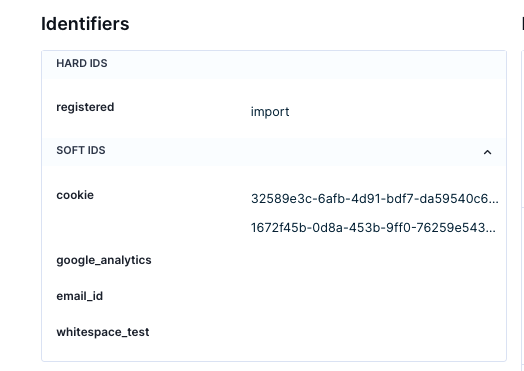
When a customer profile with more than one cookie ID enters this webhook, the customer update won't apply to the existing profile. Instead, it will create a completely new customer profile with the cookie ID displayed like illustrated in the following screenshots:
Input profile
Output profile after being processed by webhook
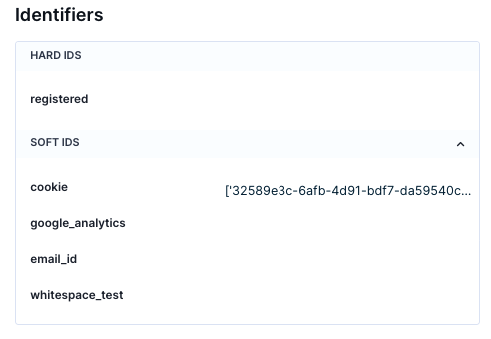
The result is the creation of a completely new customer profile, where the cookie value is now a string with the value "['32589e3c-6afb-4d91-bdf7-da59540c6e32', '1672f45b-0d8a-453b-9ff0-76259e543d7d']", as our API was supplied with the entire list of cookies.
Our API endpoints expect a single value for the ID, not a whole list. So, if someone has multiple cookies, you’ll need to provide just one cookie value from that list.
How to resolve problems with dynamic soft IDs in webhooks
A solution to this issue can be implemented using JINJA code that you can add to the identifiers section. In this example, you'll be working with a model where the cookie is used as your ID, but this approach can be adapted for any other Soft ID naming.
You'll need a JINJA if condition to check if the Soft ID is a string. If it is, you'll output the entire identifier. If it's not a string, for example, if it's a list with multiple values, you'll output just the first cookie from that list.
{%if customer_ids.cookie is string%}"{{customer_ids.cookie}}"{%else%}"{{customer_ids.cookie |first}}"{%endif%}
In the whole context, you'll need a payload like this for your webhook that includes the condition mentioned above.
{
 "customer_ids": {
   "cookie": {% if customer_ids.cookie is string %}"{{ customer_ids.cookie }}"{% else %}"{{ customer_ids.cookie|first }}"{% endif %}
 },
 "properties": {
   "first_name": "Marek"
 }
}
This approach works for both types of customer profiles that might come through the webhook. It handles profiles with a single cookie value as well as those with two or more cookie values in their Cookie ID.
Additionally, updates from the webhook will update the existing customer profile referenced through JINJA, avoiding the creation of unwanted new profiles.
Conclusion
By following the information in this article, you can avoid creating unnecessary customer profiles and ensure you always target the right profile, even if a customer has multiple cookie values in their Cookie ID.