Support for Bloomreach Marketing is available to all platform users and is ready to assist with a broad range of issues. This guide will help you understand the following:
Support scope
📘
Some requests may need to be redirected to Client Services for paid consulting, depending on the complexity and time required for the resolution. If your request need a consultancy session, your CSM will help you to arrange all the necessary details.
Within the scope
The Marketing support team is available to assist customers with the following categories of requests:
- Any technical issues of varying degrees of severity that affect the use of the platform
- Assistance when the platform behavior is not functioning as expected
- Identification of bugs that are passed to product development for fixes
- General questions regarding the platform and its use
- Preliminary investigation of deliverability issues
- Assistance in building a use case
- Advice on how to code small solutions with Jinja
- Loomi BigQuery (formerly EBQ) - Troubleshooting and debugging data flow from the platform to the Loomi BigQuery
- Mobile SDK: We assist with debugging SDK issues (for example, in-app errors) and process bug reports related to SDK functionality. To be eligible for support for SDK-related issues, you must have updated it to the latest version and not modified the implementation code with custom solutions. Additionally, you'll need to provide us access to your application or provide relevant app logs and implementation details. Please note that Marketing support is the official channel for reporting mobile SDK-related bug reports and issues.
Out of scope
The Marketing support team is not available to assist customers with the following categories of requests:
- Platform / Instance / Account / Project Administration:
- Creating, deleting, or managing accounts and projects
- Managing IDs (add and edit settings for
soft_idorhard_idof the project) - Managing accesses for projects/accounts/instances, Loomi BigQuery (formerly EBQ), or tools where Bloomreachers are not administrators
- Deleting data
- Changing the status of accounts/projects (hard lock, soft lock)
- Creating new projects or accounts
- Troubleshooting, debugging, or fixing:
- Custom code (JS, CSS, regexp, HTML, Python)
- Custom integrations
- API endpoint of third parties that are not among the list of native integrations
- Custom implementation of tracking
- Software not developed by Bloomreach
- Creating use cases from scratch
- Creative consultancy (email templates, designs, weblayers designs)
- Launch live scenarios, email campaigns, weblayers, experiments, tags
- Advanced deliverability consulting
- Creation, migration, and setup of new domains for email service providers
- Help with the setup of new integrations
- Loomi BigQuery (formerly EBQ) - troubleshooting and debugging data in the Loomi BigQuery
- Mobile SDK - the support team doesn't provide assistance with the implementation of the SDK to a mobile app, for example, how to include deep links support into a mobile app, or how to include a specific component of the SDK in a mobile app.
- We're not providing any Audit Log info to clients. Please reach out to your CSM if you need assistance or have any questions about Audit Logs. You can find additional information on this feature here.
Best practices
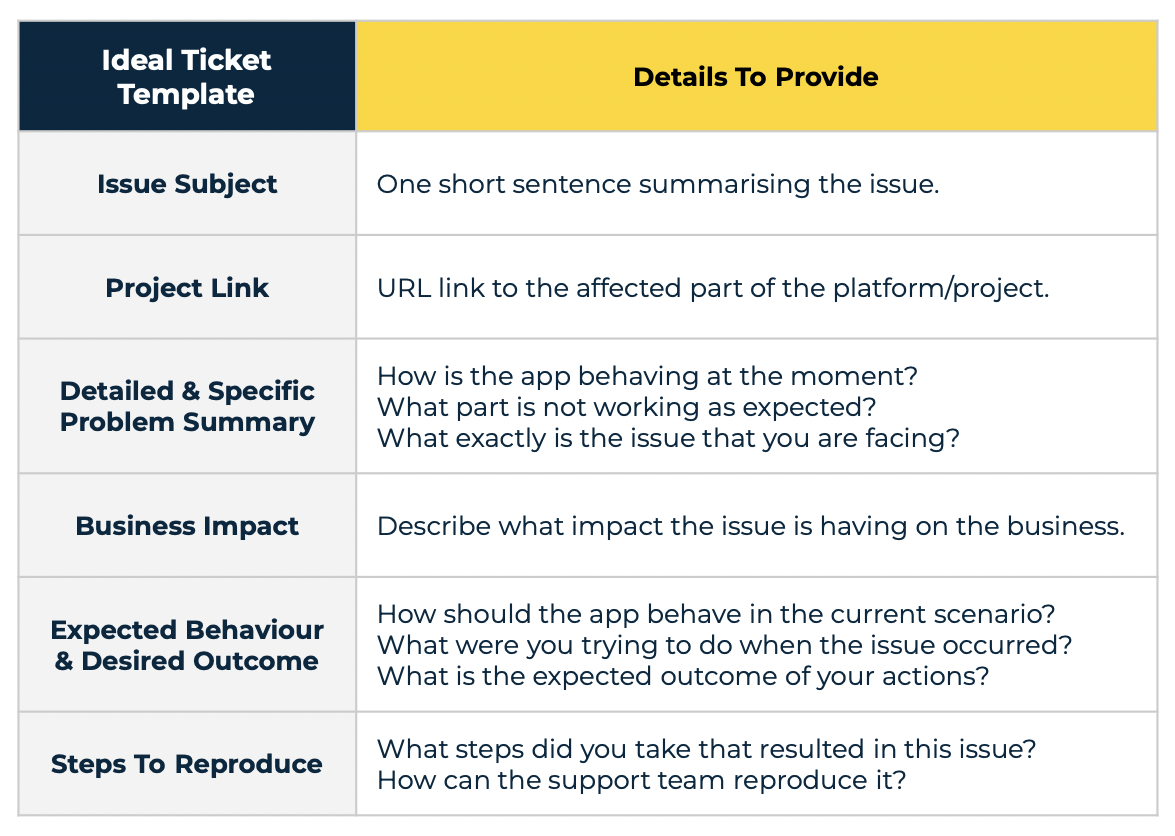
1. Provide specific examples and links to all related resources to ensure that any given request can be processed as effectively as possible and that the support team can recreate the issue.
2. Raise a support request for each individual issue. The aim is to keep the communication as clear and as effective as possible. By separating the issues, we can decrease the resolution time.
Ticket management
There are three levels of support for resolving the clients' queries about Bloomreach Marketing:
1. The first line of support (L1) - the first line of support resolves the majority of the requests. First-line support agents gather the necessary information, do the investigation, and, if possible, resolve the issue. In cases where first-line support is unable to do so, the issue will be escalated to the second line of support.
2. The second line of support (L2) - the second-line support, which continues with an in-depth investigation and provides updates about the resolution to the first-line agents. In cases where second-line support is unable to resolve the issue, it will be escalated to the third line of support.
3. The third line of support (L3) - the third-line support consists of on-call developers operating 24/7 who can solve the most advanced technical issues. They provide updates to second-line agents, who in turn inform the first-line agents.
When a member of the support team escalates the issue to a higher line of support (L2 or L3), they fill in an internal support ticket. As a client, you will not have direct access to the ticket. Instead, you will be informed about status changes via messenger.
It is quite common for our support team to request a HAR (HTTP Archive) file to investigate the issue you are having closely. To do this, refer to the "How to Generate a HAR File" page and follow the guide for your browser.